aSa Mobile
Turning time-consuming and urgent status requests into a simple access experience


A mobile extension of aSa.Studio, an ERP platform used by rebar fabrication companies, for Applied Systems Associates, Inc. (aSa) to give shop managers real-time access to production status on-the-go instead of restricting it to a single location.
This case study omits certain confidential details.
I can share more details about the problem space, my contributions, and the significant and quantifiable impact we made in an interview.
Role
Led the creation of the mobile design system, documentation and presentation design, and cross-team design communication; contributed to research protocol creation, team decision making, and data synthesis
Team
1 product manager
2 product designers
1 technical designer
1 technical lead
Timeline
6 months


Context
aSa wanted to make a mobile app, but didn’t know if their customers needed one.
aSa felt pressure to make a mobile app since much of the enterprise resource planning software industry has already branched into this territory, but nobody knew whether mobile access would actually solve a real problem for their customers, or what information needed to be available. We had to figure that out before moving forward.
research
Phase 01.
Is creating a mobile app worth the effort for aSa?
During our first phase of research, we aimed to understand what customers needed and whether or not a mobile app could improve their workflow and address real pain points.
What are aSa customers' Actual pain points?
With a combination of site visits, primary user interviews, secondary interviews, AEIOU observation research, card sorts, and other bespoke activities designed to probe at the current user experience, we uncovered specific pain points that validated that the biggest unmet user need was accessing info outside of the existing desktop environment.
Everyone had the same question
The moments that mattered most happened away from a desk
Additional findings are confidential
which individuals would benefit most from a Mobile app?
We synthesized findings from 10 interviewees, each of which understand and interact with roles across the rebar fabrication industry, in order to identify if there were any patterns among their opinions.

Shop managers were the most emphasized user segment that would benefit
Product Concepts
Now that we know customers need to access data outside of aSa.Studio, are there multiple ways to meet this need?
By the end of Phase 1, we'd validated a need that could be met by a mobile app, but we took it further by ideating ways to address other facets of the information access gap.


Proposing three product directions for the next phase
I illustrated a conceptual diagram for our presentation to aSa's executives that laid out how each direction tackled a different facet of the same underlying access problem.
Mobile App
Customer Portal
Additional product directions are confidential
research
Phase 02.
How should we design the mobile app and portal experience?
Moving forward with the mobile app and customer portal, we started our second phase of research to explore and define the expression of these new products.
How should we design the mobile app?
Prioritize speed and ease of answering key questions over adding new features
Customers were blunt about the fact that if the mobile product wasn't faster and easier than making a phone call to someone who could check aSa.Studio on a desktop, they simply wouldn't use it.
Customers' homepage preferences varied
Testing navigation and layout options showed management workflows varied so widely between companies that picking one default view for everyone wasn't going to work. A level of customization would be necessary.
Customers prioritized access to status updates that deviate from the ideal
Through tests like card sorts, we identified that General Managers and Plant Superintendents prioritized including low inventory, downtime for machines, or delays in shipment progress in the app. If any data indicated a deviation from ideal production progress, they'd want to see it up front.
How should we design the customer Portal?
Internal rebar fabrication terminology doesn't match customer language
aSa.Studio data categories like "loads" and "stops" make sense to rebar fabrication companies but would be confusing for the fabricator's customers to engage with inside the portal.
Maintaining important boundaries with customers was a core concern
Fabrication companies worried that showing every detail of their timeline and output in realtime would overpromise and create unrealistic expectations for customers. Additionally, fabricators expressed that allowing customers to make changes to their orders on their own would cause shop floor confusion at certain stages of production.
Fabrication companies didn't want to expose their clients to more competitors
While we needed to mitigate the friction customers working with more than one fabricator would experience, we needed to make sure that customers wouldn't be able to see competitors they weren't currently doing business with within the customer portal
Key Decisions
MObile App

01.
Create widgets that managers could rearrange themselves.
Since there was no consensus on what should live on the homepage or the exact order of the information on each page, we used a rearrangeable widget structure instead of a fixed layout so each shop manager could customize the UI based on what's needed for their unique workflow.
02.
Allow for progressive complexity disclosure
Cramming everything from aSa.Studio onto a phone screen would've recreated the same complexity we were trying to bypass. Each page leads with an overview widget, and certain widgets reveal additional items or extra details when engaged through tapping or swiping.

03.
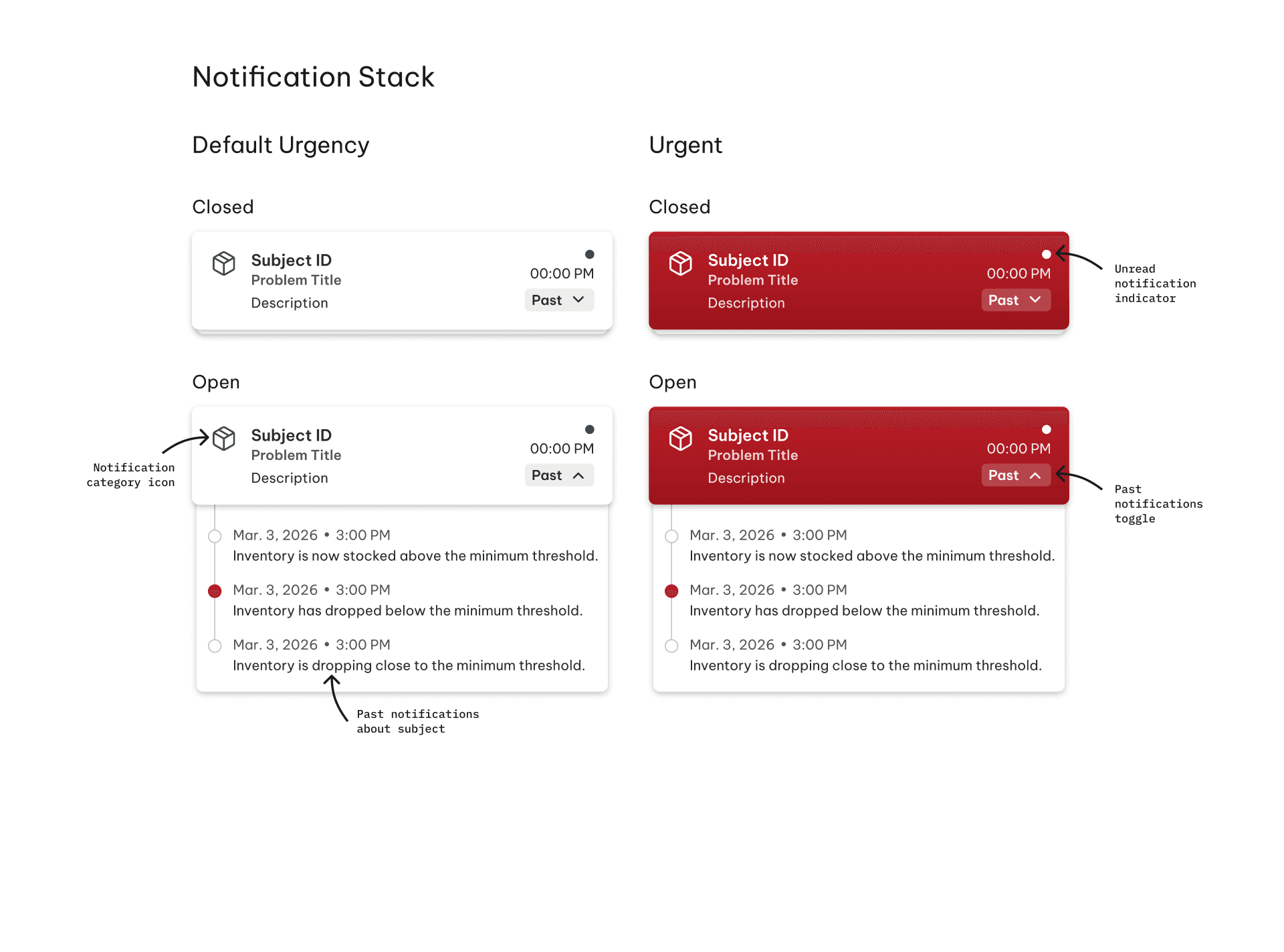
Create a design system built for handing off to aSa's internal team
I led the creation of the mobile design system and pushed for consistent organization across our design files, knowing the project would be picked up by aSa's internal team after we left.
That meant naming conventions and component structure had to make sense to people who weren't in the room for our research. I made sure our components were intentionally nested within one another, were given variables with descriptive names, and were tested to catch tiny and easy to overlook errors before handoff.
Customer Portal

01.
Make customer edits become requests, not overrides
Fabrication companies were worried that customer changes would stealthily alter their schedules without warning.
We added an approval layer so any change a customer makes shows up as a pending request in the fabricator's system first, ensuring no surprise changes to the schedule occur. The customer can see the status of their request in real time, removing the guess work and making a phone call to check in on their order feel less necessary.

02.
Keep some data private on purpose
Fabrication companies need to underpromise and overdeliver, not expose every hour of slack or delay in their production timeline. We held certain fulfillment data back from the customer view to protect that positive relationship between fabricators and their customers.

03.
Give private access to existing order data with unique, fabricator-provided passcodes
We designed a passcode-based connection system that allows customers to create a single aSa customer portal account and connect with each fabricator they already work with who uses aSa.Studio.
The fabricators provide their customers with a unique generated passcode, granting customers access to their order's status without inadvertently exposing them to competing fabricators in the area.
Impact
The new products we created granted portable and quick access to critical data, which could save rebar fabricators significant communication time both internally and with their customers.
More detailed estimations of projected impact are confidential.
I can share more details about the problem space, my contributions, and the significant and quantifiable impact we made in an interview.
Reflections
I learned so many valuable lessons by the end of this project.
Whiteboards are impactful clarification and translation tools
I used real-time illustration and on-the-fly sketching constantly (with both teammates and stakeholders) to clarify both what my collaborators meant and what I was trying to convey. That practice resolved misunderstandings before they led to downstream frustration.
Leadership doesn't require the title
I wasn't the formal design lead, but I frequently did that job anyway. I spearheaded the organization of our design system and design files, constructively critiqued teammates' work to improve accessibility, consistency, craft, and hierarchy, and taught advanced Figma techniques to my fellow designers to cultivate smart and efficient design habits within my team.
Good handoff is a crucial part of every design
We didn't have a chance to test everything before the capstone ended, so I advocated for and wrote important parts of our documentation that flagged exactly which parts of the design still needed validation. I also finalized our Figma files so aSa's internal team could pick up the components and implement our designs without baking in untested assumptions or losing critical momentum.
Start building real screens earlier
We stuck closely to the capstone's research-then-build cadence, and only once we started assembling a polished prototype did some of our unvalidated assumptions surface. Prototyping high fidelity designs in parallel, even if we wanted to test with low fidelity prototypes so we could get clearer results, would have caught those questions sooner and made our first few tests even more effective.